Documentation snapshot: November 2026. This is a community architecture and installation guide, not a vendor-certified appliance. Both repositories evolve quickly, so confirm current defaults, command names, and provider support against their source before relying on them.
A capable language model is only one part of a useful development system. The environment around it determines whether an agent can keep context across long sessions, recover from an interrupted continuation, separate research from implementation and verification, and leave behind evidence instead of confident prose.
Two complementary open-source repositories address that environment:
- GatPi is a source-maintained fork of the Pi coding agent.
- GatPi-Harness is the operational layer: extensions, policies, workflows, and shared libraries loaded into that runtime.
A third project, GatPi-Fleet, adds separate observation and management interfaces. It is not required for the setup described here.
Two repositories, one environment
The split is deliberate. GatPi operates at the agent-runtime level, where fundamental behavior such as terminal rendering, session restoration, and context compaction can be corrected in source. The harness sits above it and contributes commands, tools, workflows, and safeguards without turning the runtime into a monolithic application.
| Layer | What it is | What it owns |
|---|---|---|
| Upstream Pi | Minimal, extensible coding-agent runtime | CLI, TUI, agent loop, provider integration, extension framework |
| GatPi | Source-maintained fork of Pi | Targeted runtime corrections and a reproducible source-linked build |
| GatPi-Harness | Extension and operations repository | Accounts, governed tool use, repository intelligence, verification, memory, delegation, automation, diagnostics |
Neither project trains or ships a language model. GatPi connects to hosted providers, subscription-backed accounts, API endpoints, self-hosted models, or custom providers configured in Pi. Model availability, pricing, and context limits remain the provider's concern.
A useful shorthand: GatPi executes the agent; GatPi-Harness governs and extends how that agent works.
The runtime: why fork Pi
Pi is organized as a monorepo rather than a single executable. Its important components include:
| Component | Responsibility |
|---|---|
pi-coding-agent |
Interactive coding-agent command-line interface |
pi-ai |
Unified interfaces for model providers |
pi-agent-core |
Agent execution, state, and tool calling |
pi-tui |
Terminal interface and rendering |
pi-durable |
Durable runtime structures |
pi-telemetry |
Telemetry abstractions and contracts |
chord |
Typed host and plugin runtime facilities |
Package names and subpackages change with upstream Pi, so the repository remains authoritative. The point is that GatPi can correct behavior at the layer where it originates instead of layering workarounds around it.
The fork's improvements concentrate on long interactive sessions:
- Terminal compatibility. It disables certain OSC 133 zone markers and terminal-title writes that can disrupt rendering, adjusts color detection for
tmuxand GNU Screen instead of trusting inherited environment variables, and falls back to 256-color or ANSI modes when appropriate. Code blocks get improved wrapping and boxed presentation. - Resize behavior. After a resize, GatPi repaints the viewport rather than replaying an entire long scrollback. For idle sessions it tries to preserve a coherent visible suffix beginning with the latest assistant answer.
- Compaction presentation. Compacting model context should not destroy the human-readable history. The fork retains visible scrollback and appends a compaction indicator instead of rebuilding the display from the reduced context.
- Session restoration. Interrupted continuations, branch navigation, visible-branch reconstruction, extension reloading, input history, and multiline prompt navigation are all handled more reliably.
- Session storage permissions. Managed session directories and files use restrictive permissions such as
0700and0600where applicable. That reduces accidental cross-user exposure on shared hosts; it is not a substitute for disk encryption or host security. - Familiar aliases.
/clearand/exitjoin native commands such as/new,/quit,/compact,/resume,/reload,/settings, and/model.
The compaction change is worth pausing on, because three different things are often conflated:
Model context is what the language model currently receives. Session history is the durable conversation record. Terminal scrollback is what the human can still inspect. They are related, but they are not the same thing.
Source-built, not patched in place
The normal deployment model is now:
- Maintain the fork in Git.
- Build it from source.
- Link the resulting coding-agent package into the user's npm environment.
- Verify that the active executable points to that build.
- Update through the harness-managed source workflow.
Earlier distribution-level patches remain available as a rollback mechanism, but they are no longer the primary path. This is more reproducible than patching a global npm installation after each upstream release.
For the same reason, do not use pi update as the normal update mechanism for a linked GatPi fork. The upstream updater or a fresh install of the published Pi package can replace the link and silently change which executable runs.
The harness: an operational layer
GatPi-Harness is not another fork of the Pi engine, a replacement model, or a separate desktop application. It is a collection of extension modules, shared libraries, scripts, configuration, workflows, and skills that load into the running Pi environment.
At the November 2026 snapshot, the repository lists 51 extensions and 129 skills. That number is less important than how they are exposed. The portfolio distinguishes core extensions, normally enabled extensions, command-only features, intent-gated features, child-agent-only features, explicit-only features, experimental canaries, and capabilities still awaiting field evidence.
Installing an extension does not mean every capability inside it is continuously active. That distinction returns throughout this guide.
The harness's main responsibilities are:
- Installing and maintaining the linked GatPi runtime.
- Loading project-aware extensions and configuring default operational policies.
- Managing multiple model accounts and fallback preferences.
- Providing governed CodeMode execution.
- Navigating and analyzing repositories.
- Integrating external development tools.
- Planning and tracking complex tasks.
- Running specialized child agents and coordinating multi-agent workflows.
- Collecting verification evidence.
- Managing bounded automation.
- Maintaining structured project knowledge.
- Integrating optional Hermes advisory capabilities.
- Recording privacy-conscious operational telemetry.
- Protecting the runtime against resource and workflow failures.
Architecture and boundaries
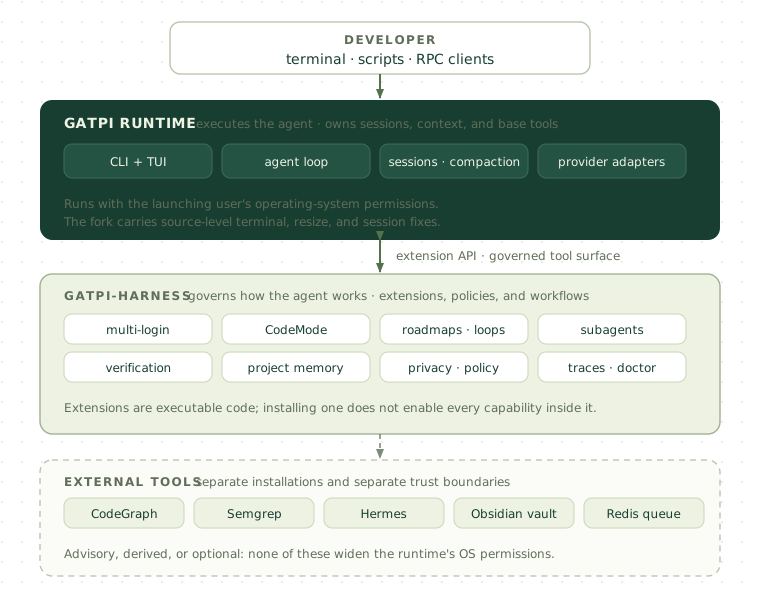
Five boundaries matter more than the feature list:
- The runtime owns agent execution. GatPi is responsible for the executable, model conversations, terminal interface, sessions, and base tool environment.
- The harness owns operational extensions. It contributes commands, tools, workflows, policies, and adapters.
- External tools remain external. CodeGraph, Semgrep, Hermes, Obsidian, and Redis have their own installation and operational requirements.
- Durable memory is not conversation history. Transcripts, structured notes, and rebuildable indexes serve different purposes.
- A tool facade is not an operating-system sandbox. Security must be evaluated at the layer that actually enforces it.
This division lets runtime improvements and higher-level workflows evolve independently. It also makes failures easier to localize: a missing optional integration should not be mistaken for a broken core CLI.
Governed tool composition
A conventional agent often performs a long series of individual tool calls: list a directory, read a file, search for symbols, read another file, retrieve documentation, run a test, and summarize. Each round trip adds overhead and consumes context.
CodeMode lets approved operations be composed inside a bounded execution environment instead.
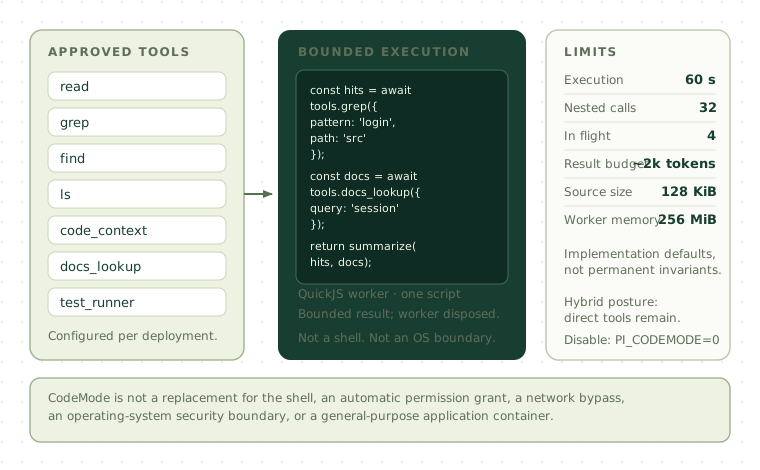
The exact operation set depends on the extension and its configuration. The documented implementation defaults are approximately:
| Limit | Default |
|---|---|
| Execution duration | 60 seconds |
| Nested tool calls | 32 |
| Concurrent calls | 4 |
| Returned result budget | Approximately 2,000 tokens |
| Script source size | 131,072 characters |
| QuickJS worker memory | 256 MiB |
These are implementation defaults, not guaranteed invariants for every future release.
The harness normally uses a hybrid posture: CodeMode is available while ordinary direct tools remain. Some operations are clearer or safer as individual calls. The harness also disables Pi's competing built-in CodeMode registration when loading its governed implementation, avoiding an ambiguous duplicate tool surface.
For a process where the governed implementation should not be available:
PI_CODEMODE=0 piOr exclude the tool through the CLI:
pi --exclude-tools codemodeCodeMode is not a replacement for the shell, an automatic permission grant, a network-access bypass, an operating-system security boundary, a guarantee that every operation is safe, or a general-purpose application container. Its value is controlled composition of approved operations.
Understanding a repository
The harness offers several complementary ways to inspect code, because different tools answer different questions:
| Question | Useful tool |
|---|---|
| Where does this string appear? | Text search |
| Does this syntactic pattern occur? | AST search |
| Which modules reference this component? | CodeGraph |
| What might a change affect? | CodeGraph change-impact query |
| Does the language server report a problem? | LSP diagnostics |
| What changed, and in which revision? | Git |
| What does this installed library actually expose? | Documentation lookup |
| How is this project structured and built? | Project profile |
A graph index is a derived representation of source code, not the source itself. Refresh it when the repository changes materially.
Useful commands include:
/project-profile
/project-index
/project-recommend
/project-init-pi
/codegraph-doctor
/codegraph-sync --full
/codegraph-context
/codegraph-affected
/lsp-diagnostics
/ast-search
/ast-refactor-preview
/ast-refactor-apply
The preview-and-apply split for AST transformations is deliberate. The current AST refactor is not a full semantic symbol-rename engine; use the project's compiler, language server, and tests to validate the result.
Project initialization deserves review before application. A repository with established build scripts or automation should not have new configuration imposed casually.
Verification: evidence over confidence
An AI-generated change is not correct merely because the model describes it confidently. The harness connects claims to artifacts.
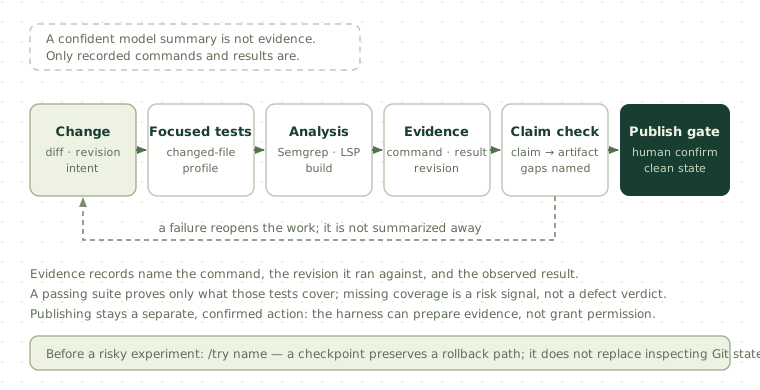
Representative commands:
/test-runner-run --profile changed
/semgrep-changed
/verify-plan changed
/verify-run changed
/test-gaps
/evidence-report
/claim-check
/git:evidence
/git:verify
/git:publish --verify
The useful question is not only “did the tests pass?” but “which claims does the recorded evidence actually support?”
| Claim | Useful evidence |
|---|---|
| The application compiles | Successful build output |
| A regression is fixed | Reproducing test before and after |
| The API remains compatible | Interface checks and integration tests |
| The change is secure | Security review and applicable static analysis |
| Performance improved | Comparable benchmark measurements |
| Deployment is ready | Relevant operational and release checks |
Static analysis is a signal, not a verdict. Semgrep can produce both false positives and false negatives, so findings need context. Missing tests are a risk signal rather than automatic proof of a defect.
Before a risky experiment, the safe-try system can create a checkpoint:
/try experimental-refactorA checkpoint preserves a rollback path. It does not remove the need to inspect Git state or protect uncommitted work. Likewise, the publish workflow is deliberately more restrictive than an unrestricted shell command: it is intended to require appropriate repository state and human confirmation. Publishing is not an automatic authorization to push arbitrary changes.
Memory with an authority hierarchy
Project memory is where many agent setups quietly go wrong. Saving every transcript feels comprehensive, but it also preserves credentials, private paths, debugging noise, outdated assumptions, and speculation. The harness instead separates five layers with different authority.
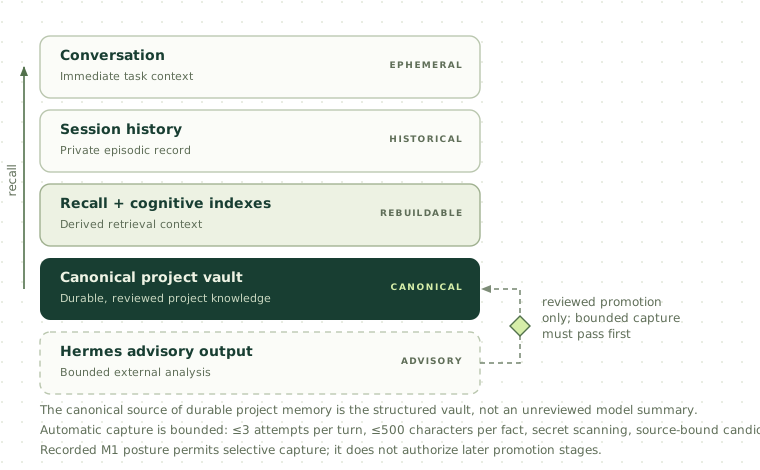
| Layer | Purpose | Authority |
|---|---|---|
| Current conversation | Immediate task context | Ephemeral |
| Pi session history | Private episodic record | Historical evidence |
| Cognitive memory and recall indexes | Derived retrieval context | Rebuildable |
| Obsidian project notes | Durable project knowledge | Canonical |
| Hermes advisory outputs | Optional analysis and curation suggestions | Advisory only |
The critical rule: the canonical source of durable project memory is the structured project-note vault, not an unreviewed model summary.
A canonical layout resembles:
Memory/
└── Projects/
    └── <repository-name>-<project-hash>/
        ├── Current.md
        ├── Decisions.md
        ├── Constraints.md
        ├── Risks-and-TODOs.md
        ├── Verification.md
        ├── Procedures.md
        └── History/
            └── History.md
Each file has a distinct job. Current.md is the current verified or corroborated view. Decisions.md records durable architectural choices. Constraints.md captures ongoing restrictions. Risks-and-TODOs.md holds durable concerns and pending work. Verification.md stores verification knowledge and references. Procedures.md contains reusable operational procedures. History.md preserves applicable historical context. Project identities, hashes, structured metadata, and validation rules reduce cross-project contamination.
At the November 2026 snapshot, the repository declares an operator-authorized M1 posture:
{
  "schemaVersion": 1,
  "stage": "M1",
  "writes": true,
  "automatic": true,
  "autoSave": true
}
That permits selective automatic capture and task-conditioned recall under documented restrictions. It does not mean later rollout stages have passed their effectiveness and privacy evaluations. In particular, it does not automatically authorize evidence-based promotion through later stages, verified automatic memory upserts, unreviewed canonical promotion, automatic Hermes curation, standing-instruction promotion, or automatic retention and cleanup. Captured facts remain bounded and unverified.
Automatic capture limits include no more than three attempts per turn, a 500-character maximum per fact, source-bound candidate extraction, secret and sensitive-content scanning, no copying of full transcripts or raw tool output, and conflict handling instead of silent overwriting.
To disable project-memory reads and writes for one process:
PI_PROJECT_MEMORY=0 piFor a selective override of the recorded posture:
PI_PROJECT_MEMORY_POSTURE=env \
PI_PROJECT_MEMORY_AUTO_SAVE=0 \
pi
Verify the resulting state with /harness-defaults-status and /obsidian-project-memory-status. Creating an empty vault directory is not the same as provisioning a confirmed canonical memory root.
Hermes is an optional external advisory system, kept outside the normal critical execution path. Its operations include /hermes-status, /hermes-doctor, /hermes-plan, /hermes-review, /hermes-evidence, and /hermes-feedback. Requests are bounded and privacy-screened, and Hermes output is never promoted into canonical memory automatically.
Bounded autonomy
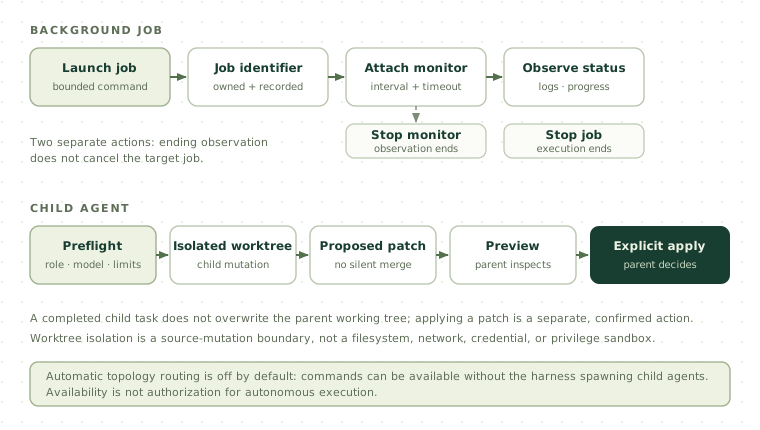
Large tasks need structure, but structure should not become uncontrolled execution. The harness separates planning, background work, observation, and child-agent integration into different mechanisms with different stopping conditions.
Roadmaps provide persistent task tracking with subtasks, dependencies, blocked items, and verification state:
/roadmap-start Improve API reliability
/roadmap-panel
/roadmap-active
/roadmap-done
/roadmap-verify
/roadmap-block
Newly discovered work should not silently replace the existing root plan. Some replacement actions are explicitly destructive and require deliberate intent.
Automation loops repeat a bounded workflow:
/loop Investigate the failing tests and propose fixes --max=10
/loop-status
/loop-pause
/loop-resume
/loop-stop
Loops need clear stopping conditions. Repeating attempts without new evidence consumes tokens and resources without making progress.
Goals are a separate goal-oriented workflow that may use Hermes-related planning or control behavior. Enabling the goal extension does not automatically start autonomous goal execution.
Background execution suits builds, longer test suites, static analysis, and benchmarks. A background command should still have clear ownership, status reporting, and termination behavior.
Run monitors observe an existing background operation; they do not repeatedly advance the agent. Their command structure refers to a valid existing run, and stopping a monitor does not necessarily stop the target job. That separation is intentional.
Subagents delegate specialized work to child Pi processes. A typical flow begins with readiness checks:
/subagent-preflight --role reviewer Inspect the changed API boundary
/subagent --role reviewer Inspect the changed API boundary
/subagent-wait latest
/subagent-show latest
/subagent-patch-preview latest
/subagent-patch-apply latest --yes
Mutation-capable child workflows are designed around isolation and explicit integration. A child may work in an isolated Git worktree and produce a proposed patch. Applying that patch is a separate action: a completed child task does not silently overwrite the parent working tree, and merging conversational trajectories is not the same as merging filesystem changes.
Role-specific model settings exist for planner, reviewer, coder, and verifier roles. Some repository defaults reference a provider named local and a DeepSeek model identifier. local is a configuration placeholder, not an automatically registered provider. Authenticating one hosted provider does not make every configured specialist role ready. Run the role's preflight operation rather than retrying launches blindly.
Topologies define how roles collaborate, for example parallel evidence synthesis or a planner-coder-verifier sequence. The current defaults expose manual topology and specialist-task interfaces while keeping automatic routing off:
PI_MULTI_AGENT_TOPOLOGIES_ENABLED=1
PI_SPECIALIST_TASKS_ENABLED=1
PI_TOPOLOGY_AUTO_ROUTE=off
That means commands can be available without the harness spawning child agents for every suitable-looking task. Availability is not authorization.
Finally, worktree isolation is not a universal sandbox. It provides a useful source-mutation boundary, but it does not isolate the filesystem outside the worktree, network access, credentials, processes, or operating-system privileges. If you execute potentially untrusted code, use a container, virtual machine, restricted service account, or other host-level control.
Installing the integrated system
The documented environment is Linux or WSL, with Ubuntu/Debian-style commands. macOS may work with different dependency commands; native Windows setup is not covered, and WSL is the clearer route.
Recommended prerequisites:
| Requirement | Purpose |
|---|---|
| Linux or WSL | Primary documented environment |
| Git | Repository checkout and updates |
| GitHub SSH access | Required by the configured source-refresh workflow |
| Node.js 22 | Pi runtime and TypeScript execution |
| npm | Dependency installation and source linking |
| Python 3, pipx | Supporting development tools |
| Build tools | Native dependency support |
| At least 2 GiB free disk space | Source setup prerequisite |
| Model-provider account or endpoint | Actual inference |
| Optional: Hermes, CodeGraph, Semgrep, Obsidian vault, Redis | Advisory, graph, analysis, memory, and queue integrations |
The configured fork requires Node.js 22.19.0 or newer, but version numbers alone are not sufficient: the refresh script checks for native TypeScript execution and Zstandard decompression support. The examples below use 22.22.2 for reproducibility.
Prepare the host
sudo apt-get update

sudo apt-get install -y \
    git \
    curl \
    build-essential \
    python3 \
    python3-venv \
    python3-pip \
    pipx
Install Node with nvm after reviewing the remote script:
curl -fsSL \
    https://raw.githubusercontent.com/nvm-sh/nvm/v0.40.1/install.sh \
    | bash

export NVM_DIR="$HOME/.nvm"
if [ -s "$NVM_DIR/nvm.sh" ]; then
    . "$NVM_DIR/nvm.sh"
fi

nvm install 22.22.2
nvm use 22.22.2
Check that npm's global prefix is writable by your user. Do not use sudo npm link to work around an incorrectly configured prefix.
Clone and build the runtime
The refresh workflow expects SSH remotes:
[email protected]:Gattic/GatPi-Harness.git
[email protected]:Gattic/GatPi.git
Configure GitHub SSH access first, then verify it with ssh -T [email protected]. GitHub may return a nonzero exit status even when authentication succeeds because it does not provide shell access; read the message rather than relying on the exit code alone.
git clone \
    [email protected]:Gattic/GatPi-Harness.git \
    "$HOME/GatPi-Harness"

cd "$HOME/GatPi-Harness"

scripts/pi-harness-refresh.sh --pi --no-check
That command reads the configured fork identity, validates the environment, clones or safely updates the GatPi checkout, verifies repository and remote consistency, installs pinned dependencies, hydrates the model catalog, builds the committed sources, links the coding-agent package, and checks that the executable points to the intended build.
The default layout is a sibling checkout:
$HOME/
├── GatPi/
└── GatPi-Harness/
Verify the result:
pi --version
command -v pi
git -C "$HOME/GatPi" status --short
git -C "$HOME/GatPi" remote -v
Do not install a separate upstream global Pi package over this installation.
Install optional integrations
Install Hermes with its upstream installer after reviewing it, then run its setup and doctor commands:
hermes --version
hermes setup
hermes doctor
CodeGraph comes from its CLI package:
npm install -g @colbymchenry/codegraph
codegraph --version
codegraph init -i
codegraph status
Semgrep is best installed in an isolated environment with pipx:
pipx ensurepath
pipx install semgrep
semgrep --version
Then install the harness extensions and skills:
cd "$HOME/GatPi-Harness"

scripts/pi-harness-refresh.sh \
    --extensions \
    --skills \
    --no-check
The extension installer updates Pi settings without replacing the whole file, preserves unrelated settings, and detects stale harness paths. The skills installer uses a managed manifest so user-maintained skills are preserved.
Authenticate and validate
Run the lightweight setup check:
cd "$HOME/GatPi-Harness"
scripts/check-project-setup.sh
Create a demonstration project, start Pi, authenticate, and choose a model:
mkdir -p "$HOME/projects/pi-sandbox-demo"
cd "$HOME/projects/pi-sandbox-demo"
git init
pi
Inside Pi:
/login
/model
Ask a simple question, then run the full validation gate after adapters and a provider are configured:
cd "$HOME/GatPi-Harness"
scripts/pi-harness-refresh.sh --check-only
Some checks may use a configured model provider or require additional local capabilities, and may consume provider usage. An unsuccessful integration check is evidence of a specific missing or failing capability, not proof that the entire installation is unusable.
Inspect which integrations are actually operational:
/harness-defaults-status
/hermes-status
/codegraph-doctor
/semgrep-doctor
/memory-durable-status
/doctor-hot-path
Multiple accounts and failover
The multi-login extension supports multiple accounts for selected providers, tracks model preferences, detects specific account-exhaustion conditions, applies cooldowns, selects configured fallback models, and preserves per-project model preferences.
A user-level configuration lives at ~/.pi/agent/multi-login.json. An illustrative structure:
{
  "accounts": {
    "anthropic": 2,
    "openai-codex": 2
  },
  "priority": [
    "anthropic/<available-model-id>",
    "openai-codex/<available-model-id>"
  ],
  "cooldownMinutes": 60
}
Replace the example model identifiers with IDs actually available through your authenticated providers; pi --list-models or the interactive selector shows them. Authenticate each named identity separately with commands such as /login anthropic and /login anthropic-account-2, and inspect state with /multi-login.
Failover is intentionally narrow. It focuses on identified authentication failures and quota-exhaustion conditions rather than retrying every error on another model. It does not assume every generic HTTP 429 response is a confirmed exhausted account, and it does not provide universal real-time quota telemetry. The runtime may remember the last selected model for a working directory using a hashed project identity.
One important limitation: child agents may inherit model configuration without receiving the parent's complete account-failover behavior. Verify the child model's readiness during preflight instead of assuming multi-login will resolve every child-process failure.
Optional Redis queue
The queue coordinates requests for a configured local-model provider when several Pi sessions share a limited model server. It applies to the local provider path; ordinary hosted provider requests do not automatically route through Redis.
The installer installs the Redis client dependency but does not deploy a server, TLS certificates, credentials, firewall rules, or a production broker. For a configured local provider, the queue may refuse requests when the broker is unavailable. That fail-closed behavior is intentional: silently bypassing required coordination would defeat the queue's purpose.
For a deliberate single-host or development session:
PI_QUEUE=0 piDo not treat that as a general production fix for a broken shared queue. A production broker needs appropriate TLS and access control, and broker addresses, passwords, client certificates, and credential-bearing connection strings must not be published.
Updating without losing the source link
The harness provides one maintenance entry point with explicit modes:
| Command | Behavior |
|---|---|
scripts/pi-harness-refresh.sh |
Refresh extensions and skills, then run full checks |
scripts/pi-harness-refresh.sh --pi |
Refresh the linked GatPi runtime, then run checks |
scripts/pi-harness-refresh.sh --all |
Refresh runtime, extensions, and skills |
scripts/pi-harness-refresh.sh --extensions |
Refresh extensions |
scripts/pi-harness-refresh.sh --skills |
Refresh skills |
scripts/pi-harness-refresh.sh --check-only |
Run the full validation gate |
scripts/pi-harness-refresh.sh --dry-run |
Preview intended operations |
scripts/pi-harness-refresh.sh --no-check |
Skip the full validation gate |
scripts/pi-harness-refresh.sh --pi --skip-pi-deps |
Reuse existing Pi dependencies where supported |
Routine maintenance does not automatically select a Pi source update; runtime updates are opt-in. Preview a full update before changing an installation with local work:
scripts/pi-harness-refresh.sh --all --dry-runSource updates require clean repositories:
git -C "$HOME/GatPi-Harness" status
git -C "$HOME/GatPi" status
Commit or safely resolve intentional modifications. Do not reset a dirty repository merely to make the updater pass; the refusal is a safety feature. The updater also validates remote identities and refuses unsafe repository states instead of discarding work.
After extension or runtime updates, restart Pi. /reload may be sufficient for supported resource changes, but a new process is safer for environment-level changes because a running process retains values captured at launch.
When moving to another machine, reproduce the software from Git and recreate local state through its intended workflows: provider authentication, Hermes setup, local model definitions, external tools, queue credentials, certificates, and machine-specific environment variables. Treat ~/.pi/agent/, its session directory, settings, model configuration, and project-local .pi/ directories as potentially sensitive. They can contain session metadata, private traces, caches, debugging artifacts, roadmap state, evidence records, and runtime diagnostics. A canonical vault can be migrated with normal secure file handling, but preserve its schema, avoid merging unrelated project identities, and do not treat old free-form notes as verified memory.
When something is missing
| Symptom | First check |
|---|---|
pi is not found |
command -v pi, node --version, npm prefix -g; rerun --pi --no-check in the same Node environment |
| The refresh script rejects Node | Install the documented Node version and confirm native TypeScript and Zstandard support |
| The updater rejects the remote | Inspect git remote -v; reconcile an HTTPS clone with the expected SSH identity after verifying the checkout |
| The updater refuses a dirty worktree | Commit, safely stash, or deliberately resolve changes in both repositories |
| Harness commands are missing | Refresh extensions, restart Pi, and inspect ~/.pi/agent/settings.json |
| CodeGraph commands are unavailable | Check codegraph --version, initialize the repository, and run /codegraph-doctor |
| Semgrep fails | Check semgrep --version; repair the isolated install with pipx reinstall semgrep |
| Hermes is unavailable | Check hermes --version, hermes doctor, then /hermes-status and /hermes-doctor |
| A specialist role cannot start | Check role enablement, provider existence, authentication, local services, sandbox capabilities, and process limits; run preflight |
| Project memory is not saving | Inspect posture and vault status; a new empty vault may not be enough for automatic capture |
| Local-model requests fail on Redis | Confirm the request uses the local provider; configure the broker or use deliberate direct mode |
| Terminal rendering is wrong | Check TERM and COLORTERM, use a compatible terminal, and confirm the active executable is the GatPi build |
| Full validation fails while basic Pi works | Run check-project-setup.sh, compare with --check-only, and investigate the reported component |
A failure involving an optional tool, a configured provider, or a model-backed smoke test may be narrower than a failure of the core CLI. Diagnose the reported component before reinstalling everything.
Security: the OS is still the boundary
The harness adds useful guardrails, but the most important security boundary remains the operating system.
- Pi runs with the launching user's permissions. The runtime does not provide a general built-in permission sandbox for every filesystem, process, or network operation. Extensions are executable code. A model-facing restriction does not prevent a malicious extension or compromised process from using the host user's permissions.
- Policy enforcement is not OS enforcement. A model-facing policy may block a particular tool call while the underlying process still has its host privileges.
- Review extensions before loading them. Source-linked extension directories mean updates can change executed code. Review Git changes, understand newly requested capabilities, run tests, validate dependencies, and confirm security-sensitive defaults.
- Do not put secrets in prompts. Even with privacy scanning enabled, do not paste credentials into a model conversation. Use dedicated secret-management mechanisms, and treat model-provider requests and external advisory services as separate trust boundaries.
- Keep durable memory minimal. Avoid storing raw transcripts, personal information, private infrastructure identifiers, passwords, API keys, private reasoning, entire logs, and unnecessary absolute paths.
- Require evidence before publishing. Inspect the diff, run appropriate tests, review generated configuration, check for accidental secrets, confirm the intended files, and verify that publishing is authorized. Generated code is not reviewed code merely because an agent produced it.
- Treat automation as bounded execution. A loop, goal, subagent, or background process needs a clear task, appropriate permissions, observable status, resource limits, stopping conditions, and explicit approval for consequential operations.
For higher-risk work, use containers, virtual machines, restricted service accounts, read-only filesystem mounts, explicit network restrictions, separate credential stores, and host-level process and filesystem controls. The harness's runtime safeguards—trace limits, privacy scanning, managed-process memory ceilings around 6144 MiB, proactive compaction near 80% context utilization, bounded tool output, and tool-churn guards—help with operational reliability. They do not replace isolation.
Implemented is not authorized
This is the most important limitation in the design, and it is easy to miss in a feature tour.
The existence of code is not equivalent to authorization for autonomous execution. Installing an extension does not imply that every capability it contains is active, exposed, or approved for the current task.
- The extension portfolio distinguishes core, normally enabled, command-only, intent-gated, child-agent-only, explicit-only, experimental canary, and evidence-pending surfaces.
- Automatic topology routing is off by default even when topology and specialist-task commands are enabled.
- Hermes advisory is intent-gated and never promotes its output into canonical memory automatically.
- Several memory-management operations require explicit user intent, and the recorded M1 posture does not authorize later promotion stages.
- Output compaction runs in a limited canary posture for selected tools rather than transforming every result.
- Publishing requires repository state and human confirmation; it is not an unrestricted shell command.
- Child-agent patches require explicit preview and apply steps.
The design is trying to keep sophisticated workflows inspectable, bounded, reproducible, and evidence-driven rather than merely numerous. That is also the right posture for anyone operating it: treat availability as a capability to evaluate, not as permission to execute.
GatPi-Fleet and the wider ecosystem
GatPi-Fleet is a separate project associated with the broader environment. Where GatPi and GatPi-Harness concentrate on execution and operational workflows, Fleet is aimed at observing and interacting with the environment through additional interfaces, including terminal- and Android-oriented interfaces, session visibility, and remote-host monitoring.
| Project | Primary responsibility |
|---|---|
| GatPi | Core coding-agent runtime |
| GatPi-Harness | Extensions, coordination, memory, verification, and safeguards |
| GatPi-Fleet | Separate observation and management interfaces |
Fleet is not required for the installation described here. Its architecture, deployment, authentication, and networking deserve a dedicated guide.
Sources and further reading
- GatPi
- GatPi-Harness
- GatPi-Fleet
- Upstream Pi
- GatPi-Harness README
- Complete installation guide
- Source-fork configuration
- Unified refresh script
- Operational model
- Runtime configuration
- Source-level Pi modifications and legacy patches
- CodeMode
- Subagents
- Topology cookbook
- Specialist tasks
- Project memory operations
- Pi queue
- Extension portfolio
- Agent Skills catalog
- Hermes Agent
- Semgrep