Documentation snapshot: November 2026. This is a community architecture and operations guide, not a vendor-certified appliance. Command names, protocol versions, quota readers, and Android toolchain pins change. Confirm them against the GatPi-Fleet source before relying on them.
A single Pi session is a conversation in one terminal. Several sessions are a different problem. One may be waiting for a confirmation, another compiling, a third near its context limit, and a fourth running on a machine you are not sitting in front of. GatPi-Fleet is the observation and control layer for that situation. Its primary interface is a terminal dashboard, pi-dash. Around that it adds SSH relays for other Linux hosts, an optional private Android gateway, and an experimental glance display for Even Realities G1 glasses.
Fleet does not replace the agent, train a model, or perform the agent's development work. It makes running sessions visible, and it exposes a bounded set of controls so you do not have to keep switching terminals to find out which one needs you.
Examples, not your machines. Host aliases such as
worker-a, hostnames underexample.test, and everyREPLACE_WITH_value below are placeholders. Substitute your own SSH destinations, addresses, and toolchain paths. Do not publish real hostnames, pairing output, tokens, or keys.
If you still need the runtime and the operational extensions, start with the GatPi and GatPi-Harness guide. Fleet can run against another compatible Pi installation; the harness is not required for the dashboard itself.
What Fleet is for
Traditional terminal agents assume one active conversation. That holds until the work is concurrent. A useful management view has to answer, without opening every shell:
- Which sessions are working, waiting, rate-limited, or exited?
- What tool is running, and is the CPU in the Pi process or in a child build?
- How close is the context window to its compaction threshold?
- What has the session used, in tokens and in API-equivalent cost, and is a provider allowance stale?
- Did a process die, and can the saved conversation be resumed without a second writer?
- Can the same questions be asked of another Linux host, or from a phone, without exposing a public management port?
The design rule is narrow: keep agents independent, but make their activity visible and manageable from one place. Fleet extends the environment around Pi. It does not become the coding agent.
Three layers, three jobs
Fleet is the third repository in a split that is worth keeping straight.
| Project | What it owns |
|---|---|
| GatPi | Source-maintained Pi runtime: conversations, tools, sessions, terminal interaction |
| GatPi-Harness | Workflows loaded into that runtime: roadmaps, jobs, verification, memory, account failover |
| GatPi-Fleet | Monitoring and control of running sessions, including remote hosts and a private phone gateway |
GatPi executes. The harness governs how that agent works. Fleet observes the running sessions and sends supported commands to them. It does not ship a model provider, and it does not invent roadmap progress, cooldown state, or job metadata when the corresponding harness publisher is absent. Those fields should show as unavailable or unknown.
A local checkout of GatPi or GatPi-Harness is not required if a compatible Pi runtime is already installed. The current Fleet README, at this snapshot, specifies Pi 1.0 or newer. A GatPi installation satisfies that role. Advanced views — nested roadmaps, suggested next prompts, multi-login cooldowns, harness job metadata — appear only when those publishers are loaded.
Architecture
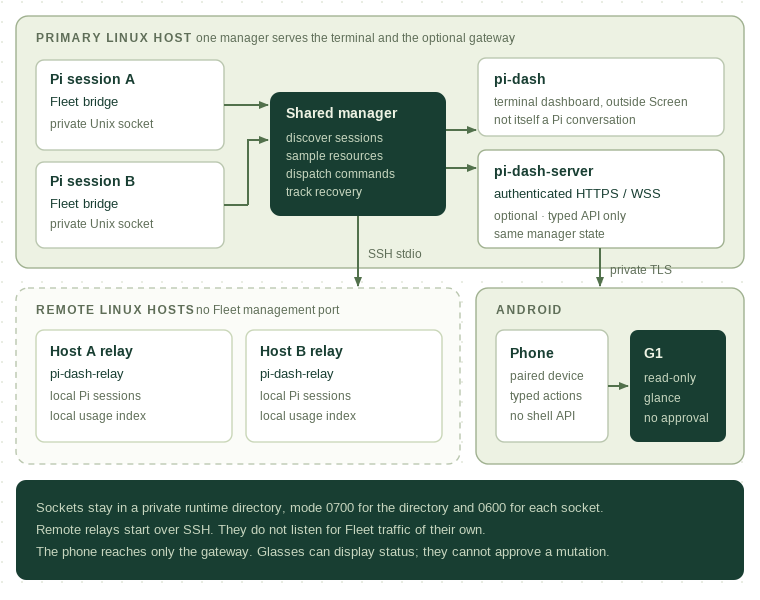
The pieces are separate processes with separate jobs. Interactive Pi sessions load a bridge. A shared headless manager collects their state. pi-dash and the optional Android gateway both read that manager. Other Linux machines run a relay over SSH. The phone talks only to the gateway. Glasses talk only to the phone.
The bridge and the manager
Each interactive Pi process loads the Fleet bridge. The bridge publishes session state and accepts supported typed commands. It listens on a Unix-domain socket under a private runtime directory, normally $XDG_RUNTIME_DIR/pi-dash/, with a directory mode of 0700 and a socket mode of 0600. The first message is a snapshot; later updates are coalesced. The wire format is line-delimited JSON.
The headless manager discovers sessions, samples process resources, aggregates usage, tracks remote hosts, dispatches commands, and holds recovery information. Because that state is not locked inside the terminal UI, the Android gateway can serve the same picture.
pi-dash renders the manager as a text interface built from Pi's terminal components. The dashboard is not a Pi conversation. Do not run it inside the GNU Screen session it uses to attach to agents.
Relays, gateway, and what is deliberately missing
A remote host runs pi-dash-relay on an SSH channel. The relay does local discovery and sends state back. It does not need a permanently exposed management port.
The gateway is a separate authenticated HTTPS and WebSocket service for phones. Its API is a list of predefined actions, not a shell. There is no unauthenticated browser dashboard and no hosted cloud relay in the documented design. Glasses receive bounded display updates from the Android app and cannot approve a mutation.
At this snapshot the repository is organized around those boundaries: android/ for the companion, api/ for generated schemas, bin/ for pi-dash, pi-dash-host, pi-dash-relay, and the gateway helpers, config/ for Screen and the systemd template, and src/ split across bridge, dashboard, hosts, manager, protocol, relay, and server. Treat the tree as a map, not a contract. It will move.
Install the dashboard
These steps assume a Linux account that already has a compatible Pi on PATH. Install GatPi first if pi is missing. Use the same unprivileged user for Pi and Fleet. Do not register the bridge as root while Pi runs as someone else; the socket, session, and agent directories need one owner.
What the host must provide
The documented host is Linux. Fleet reads /proc and cgroup v2. It is not a browser app with a Windows or macOS equivalent in this snapshot.
| Requirement | Why it is there |
|---|---|
Linux with /proc and cgroup v2 |
Process identity and resource attribution |
| Node.js 22.19 or newer, and npm | The sources run as TypeScript on modern Node |
| A compatible Pi runtime | Sessions to monitor. README: Pi 1.0 or newer |
| GNU Screen | Managed sessions and terminal attachment |
flock from util-linux |
Coordinated usage polling |
| Git | Install and project operations |
| An SSH client | Optional remote hosts |
| OpenSSL | Optional Android gateway |
On Ubuntu or Debian:
sudo apt-get update
sudo apt-get install -y git curl screen util-linux openssh-client openssl
Confirm the tools, then confirm cgroup v2. A v2 filesystem typically reports cgroup2fs.
git --version
screen --version
flock --version
ssh -V
openssl version
stat -fc %T /sys/fs/cgroup
test -r /proc/self/status && echo "Process filesystem available"
node --version
npm --version
command -v pi
pi --version
Node must be at least 22.19 before you continue. If Pi was installed through nvm, select that Node version in the shell you will use for Fleet. GNU Screen 4 and Screen 5 ship separate bundled configurations. nvidia-smi is optional and only supplies NVIDIA GPU figures. Hermes, Android Studio, and G1 glasses are optional. The terminal dashboard needs none of them.
Clone, link, and register
Clone into a normal user directory and install from the lockfile:
git clone https://github.com/Gattic/GatPi-Fleet.git "$HOME/GatPi-Fleet"
cd "$HOME/GatPi-Fleet"
npm ci
pi install "$HOME/GatPi-Fleet"
pi install registers the checkout with Pi. The package metadata points at src/bridge/index.ts, and the install updates Pi's agent settings, normally ~/.pi/agent/settings.json. Do not hand-edit that file just to add Fleet. The bridge stays linked to this checkout rather than being copied into an unrelated package directory.
Put the dashboard and the host manager on PATH:
mkdir -p "$HOME/.local/bin"
ln -s "$HOME/GatPi-Fleet/bin/pi-dash" "$HOME/.local/bin/pi-dash"
ln -s "$HOME/GatPi-Fleet/bin/pi-dash-host" "$HOME/.local/bin/pi-dash-host"
ln -s "$HOME/GatPi-Fleet/bin/pi-dash-server" "$HOME/.local/bin/pi-dash-server"
If a target already exists, inspect it before replacing it. For Bash, persist export PATH="$HOME/.local/bin:$PATH" in your shell startup only if that directory is not already there. Then check command -v pi-dash.
The bridge loads in interactive Pi processes. New sessions pick it up at start. Inside each session that is already running, reload:
/reloadPrint-mode and RPC-only child agents do not generally expose the same live bridge. Their resource use can still be attributed to a parent session when that link exists.
First dashboard
Open an ordinary terminal, not a Screen session, and start the dashboard:
pi-dashIn another terminal, a disposable repository is enough to prove discovery:
mkdir -p "$HOME/projects/fleet-demo"
cd "$HOME/projects/fleet-demo"
git init
pi
The session should appear once its bridge is active. A row that reads ? no bridge needs a reload or a restart of that Pi process. The dashboard's n command can also launch a new project session inside a detached Screen process, which is the easier controlled test if you do not want to arrange the terminals yourself.
Installing Fleet does not move existing conversations into Screen. A session already running in a normal terminal can still be monitored through the bridge. Direct terminal attachment requires an attachable Screen session. Sessions Fleet launches are created in managed detached Screen sessions named pi-<project>-<identifier>.
Read the dashboard
What you see depends on terminal width and on which collectors have data. The layout below is an illustration, not a screenshot.
PI DASH                                      HOSTS: local

SLOT  PROJECT          MODEL        STATE          CTX    CPU
-----------------------------------------------------------------
 1    backend-api      model-a      WORKING        42%     8%
 2    frontend         model-b      NEEDS YOU      67%     1%
 3    database         model-a      TOOL: tests    54%    84%
 4    research         model-c      THINKING       31%     2%
 5    infrastructure   model-b      EXITED         73%     --
Session states
| State | What it is claiming |
|---|---|
| Working, thinking, writing | The agent is executing, reasoning, or generating |
| Tool activity | A tool operation is in progress |
| Needs you | The session is waiting for interaction |
| Error, rate limited | A failure or a provider limit was observed |
| Stalled | A heuristic: a long quiet stretch and little local CPU |
| Exited | The Pi process has ended |
| Reconnecting | A remote host is temporarily unreachable |
| No bridge | A process was found without a current live bridge |
A stalled flag is not proof the process is dead. A tool can be waiting on the network. Remote inference can still be running while local CPU stays low, because the heuristic looks at Pi events and local CPU, not at the provider's queue. Treat it as a prompt to look, not as a reason to abort.
Keys worth memorizing
Number keys 1 through 9 select a slot. Arrow keys or j / k move. Tab jumps to the next session that needs attention, longest wait first. Enter opens details, Esc goes back, ? opens the legend, and q quits.
| Key | Action |
|---|---|
p |
Prompt. While the agent is working, Tab switches steer and follow-up |
i |
Side question about the current work, outside the main transcript |
s |
Read the latest reply as Markdown |
v |
Read-only live terminal peek |
a |
Attach to the Screen session. Detach with Ctrl-a d |
x |
Abort the active run |
M / T |
Change model or thinking level, within what that model offers |
Z |
Compact an idle session, after confirmation |
n / r / e |
New session, resume a saved one, or find interrupted ones |
c / C / R / d |
Close, close and start fresh, rename, or dismiss an exited row |
u / K / J / o |
Usage, context, jobs, roadmap |
H / g |
Hermes advisor, Git shortcuts |
Steer delivers after the current tool boundary. Follow-up delivers after the current run finishes. When the session is idle, the prompt editor can offer the next-prompt suggestion published by GatPi-Harness, if that publisher is present.
Peek is how you see an interactive dialog the bridge does not represent. It is not control. Attach is control: Screen's multi-attach keeps the original terminal intact, and Ctrl-a d returns you to the dashboard. Use attach when you need a Pi slash command or a dialog Fleet cannot type for you.
Manage a session
These operations are easy to confuse, and they are not synonyms.
| Key | What actually happens |
|---|---|
n |
Starts Pi in a detached Screen session for a chosen project. It keeps running after you leave the dashboard |
r |
Locates a saved conversation and launches Pi on that session file. You do not have to find the file yourself |
R |
Renames the row. A task name beats "Session 7" once the list is crowded |
c |
Confirmed close of the selected session, not merely hiding the row |
C |
Confirmed close, then a fresh session in the same project and slot. Not a continuation. If you quit the dashboard while the old process is still exiting, the replacement may not finish |
d |
Drops an exited row from the dashboard and from the Android gateway. Does not delete the transcript |
Z |
Confirmed compaction of an idle session's active context. Does not erase saved history |
M, T |
Selects among models and thinking levels the host already offers. The selector cannot invent an unsupported level |
Android uses the same ideas with different controls, covered below. Reload and restart, in particular, are not the close-and-fresh operation.
Recover an interrupted session
A dead process is not automatically a lost conversation. The bridge writes a small private lifecycle record under the Pi agent directory, normally ~/.pi/agent/pi-dash/recovery/. The record holds session identity, the saved session-file path, project, name, process identity, and lifecycle information. It does not copy the transcript into a second database. Linux boot identity and process start time are there so a reused PID is not mistaken for the original process.
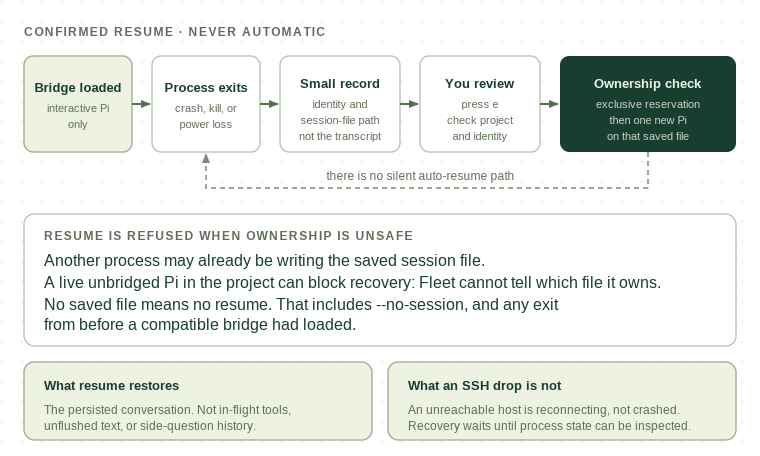
Open pi-dash, press e, read the project and identity, then choose Resume and confirm. Fleet starts a new Pi process on that exact saved file. You can attach afterward.
Recovery is never automatic. Silent resume could restart work you did not want, or open a second writer on the same file. Two Pi processes writing one session file can corrupt or interleave history. Fleet uses ownership checks and an exclusive launch reservation, and it refuses when ownership cannot be established. A live unbridged Pi in the same project can block recovery for that reason. Do not bypass the reservation until you know which process owns which file.
Resume also cannot reconstruct in-memory work. A running command may have died, unflushed response text may be gone, a partial tool call may need to be checked, and side-question history is process-local. Sessions started with --no-session have no saved file to restore. Detection itself begins only after a compatible bridge has loaded, so installing Fleet later does not reconstruct an older crash.
A remote host going offline is not a crash. Fleet marks connection uncertainty separately from confirmed process exit. Recovery suggestions for those sessions appear when the host is back and its process state can be inspected.
Resources, usage, and context
A Pi process is often the small part of the workload. The compiler, the test runner, and a child agent are the rest. Fleet attributes both, using Linux process information and cgroup relationships where they exist. A detached process that carries the session's PI_SESSION_ID can be tied back to the session that started it.
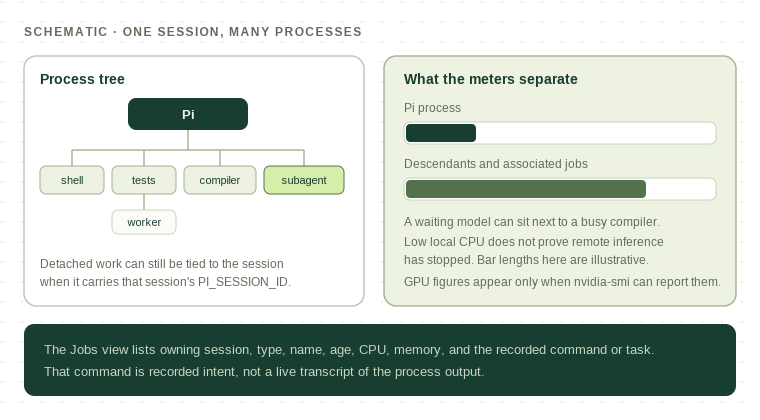
The dashboard draws Pi-process usage and descendant usage differently so a waiting model is not mistaken for a busy compiler. Memory figures are process observations, not a claim that every byte on the machine belongs to one session. GPU numbers come from nvidia-smi when it is available; without it, the dashboard still runs.
Press J for background jobs and subagents across sessions: owning session, type, name, age, CPU, memory, and the recorded command or task, as far as the terminal width allows. GatPi-Harness jobs started through mechanisms such as bg_run show up here. A session with active jobs can remain in a working state instead of looking like it needs you. The command text is recorded intent, not a live transcript.
Usage and quotas
Press u. t, w, and m select today, seven days, and thirty days. $ toggles API-equivalent cost and token counts.
An API-equivalent dollar figure is Pi's rate estimate. It is not your provider invoice and not your subscription payment. A flat subscription can sit next to a non-zero API-equivalent total. Read it as a usage estimate.
Models without usable pricing metadata are not treated as free. Fleet can show their tokens and leave the money blank rather than invent a zero. Nested work and subagents can be included when that accounting exists. They are not an exhaustive billing ledger. Side questions, for example, are accounted separately from the main transcript.
Provider quota, at this snapshot, can be read for Anthropic OAuth accounts, OpenAI Codex OAuth accounts, and xAI OAuth accounts. What a window means depends on what that provider reports. Displays can include an account alias, percentage remaining, reset countdown, window, freshness, or an explicit unsupported state.
| Freshness | Meaning |
|---|---|
| Fresh | A recent usable provider reading |
| Stale | The reading is old, or a later refresh failed |
| Unknown | No usable reading |
| Unsupported | No supported quota endpoint for this account |
Unknown is not "full." An expired reset countdown does not mean the allowance has replenished. A reported percentage does not promise the next request will succeed.
GatPi-Harness multi-login cooldowns are a different number from provider reset timers. Fleet shows them separately. Polling quota does not change failover state. OAuth renewal goes through Pi's own authentication runtime, with refresh coordinated so several processes do not race. Fleet does not have its own login system. A quota error can mean the login needs to be renewed inside a real Pi session, not that the account is empty. Separately registered aliases may have to be renewed that way.
Polling is bounded. At this snapshot, Anthropic reads are coordinated between the dashboard and the gateway and are ordinarily no more frequent than about once every ten minutes per account, subject to the documented reset and retry behavior. Codex and xAI have separate per-process schedules. Retry-After is respected. A failed reading does not become fresh. Credentials stay on the host.
Historical usage comes from local Pi session files. The derived cache is normally ~/.cache/pi-dash/usage-index.json, covering thirty days. The first scan of a large archive is the slow one.
Context windows
Press K. Inside that view, a cycles open sessions, today, and thirty days. Measured fields come from Pi: context tokens, window size, fill, compaction threshold, and last-known values for ended sessions when those exist.
The composition beside that measurement is an estimate.
| Category | What the estimate is counting |
|---|---|
| System, tools, injected | Instructions, tool schemas, and extra supplied context |
| User, assistant, tool results | The conversation and tool output |
| Summaries | Compaction summaries |
| Unattributed | Measured total minus the estimated parts |
The estimate uses a characters-per-token heuristic. Images have a separate approximate rule. Neither is the provider's tokenizer. The parts are not forced to equal the measured total. The residual can be positive or negative, and hiding it would be fake precision.
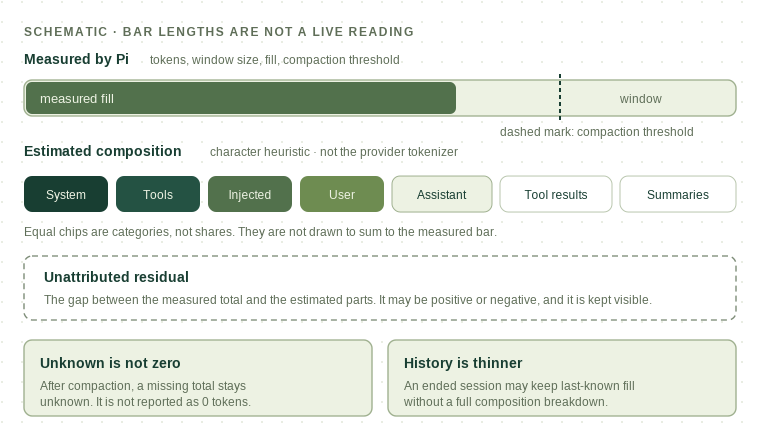
Immediately after compaction, a measured total may be missing. Fleet shows unknown, not zero. Ended sessions can keep last-known fill without a full composition. An older remote bridge can report token totals without the newer breakdown. Absence of a breakdown is not a claim that the context is empty.
Roadmaps, side questions, and advice
Press o on a session for the roadmap viewer. It is read-only. GatPi-Harness publishes the snapshot; Fleet displays it. Nested items, statuses, notes, lifecycle, timestamps, blocked work, and progress totals can appear, including a distinction the dashboard is careful about: root outcomes are not the same count as nested workflow steps. Five finished workflow tasks do not mean the project objective is done. Fleet does not collapse those into one percentage.
Snapshots are bounded so a huge roadmap cannot flood the terminal or the phone. At this snapshot the publisher limits include up to 500 entries, about 64 KiB of detail, bounded titles, and a limited number of recent notes per entry. If the snapshot was cut for those limits, the interface says so. It does not pretend the visible items are the whole roadmap. If the publisher is missing, nested detail is unavailable, not an empty plan. After a harness update, reload the Pi session so the bridge sees the new publisher.
Press i to ask the running session a question without inserting that question into the conversation. The bridge rebuilds the model context — system prompt, relevant history, tool declarations, current activity, and partial output from tools still running — and asks the session's configured model. The main run is not interrupted. Only one side question is answered at a time. The answer lives in bridge memory for the life of that process. It is a real model request, with its own usage, and any prompt-cache saving is provider-dependent. It is not free, and it is not project documentation. Keep verified findings in the project's own record.
Press H for the optional Hermes advisor. It suggests operator actions from a redacted dashboard snapshot: labels, project-directory basenames, status, timing, activity names, context fill, roadmap titles, resource totals, suggested prompts, and sanitized errors. It does not send raw full prompts, entire conversations, raw tool output, or full latest replies. Project titles and activity names can still be sensitive. Review that before you enable it.
Hermes returns typed cards. They do not grant a shell. Actions go through Fleet's command interfaces and require confirmation. If Hermes is missing, invalid, or too slow, Fleet can show deterministic local cards instead, so the dashboard does not depend on a second model for basic suggestions. Displayed, accepted, dismissed, and executed cards are recorded as feedback. That record does not make the next suggestion correct.
Remote Linux hosts
One dashboard can represent several Linux machines. The primary host starts pi-dash-relay on each remote over SSH. The remote account should be the account that owns the Pi sessions. Each remote needs Linux, SSH, a compatible Pi, Node.js 22.19 or newer, GNU Screen, and the same process facilities as the local dashboard.
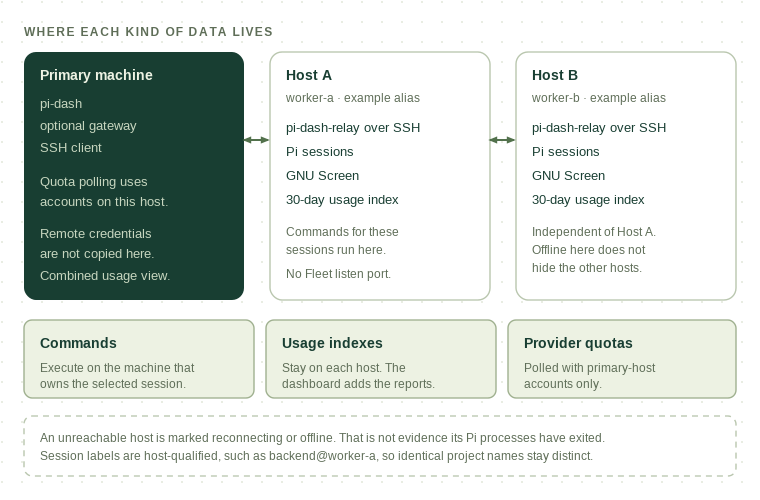
Configure aliases in ~/.ssh/config on the primary machine. This is a shape, not a host you should copy literally:
Host worker-a
    HostName worker-a.example.test
    User developer
    IdentityFile ~/.ssh/id_ed25519
    IdentitiesOnly yes
Test the alias, then test noninteractive authentication. The relay cannot stop to ask for a password.
ssh worker-a
ssh -o BatchMode=yes worker-a true
From the primary checkout, enroll the host. That deploys tracked Fleet components and registers the bridge with the remote Pi installation. Ignored local development files are not part of that copy.
pi-dash-host add worker-a
pi-dash-host add worker-a worker-b
pi-dash-host list
The remote deployment normally lives at ~/.local/share/pi-dash/. Enrolled aliases are recorded in ~/.config/pi-dash/hosts.json. pi-dash-host remove worker-b drops the alias from the primary configuration. It does not uninstall the remote copy.
Remote rows are host-qualified, such as backend@worker-a, so two machines with the same project name do not collapse into one row. Ordinary controls — prompt, side question, model change, peek, Screen attach, Git shortcuts, new session, resume, recovery — run on the machine that owns the session. Attachment is SSH plus Screen. Conceptually that is ssh -t worker-a screen -rx, with Fleet choosing the Screen session.
If a host becomes unreachable, its state is reconnecting or offline, other hosts stay available, and reconnection uses bounded backoff. Offline does not mean the remote sessions crashed.
Each relay indexes that host's recent session files and keeps the derived cache locally. The dashboard adds those reports to the local ones: totals, per-host share, sessions, and models. Quota polling is not the same mechanism. It uses authenticated accounts on the primary machine. Credentials that exist only on a remote host are not copied over for polling.
After you update Fleet on the primary machine, redeploy with pi-dash-host add and reload remote Pi sessions with /reload. Restart the local dashboard after a protocol change, and restart the gateway if you use it.
A private Android gateway
The gateway is optional. The terminal dashboard and the SSH relays do not need it. The phone talks only to pi-dash-server, over HTTPS and WSS, and the gateway reaches local sessions and SSH-connected hosts. The phone does not open SSH to every machine.
Run the gateway as the same unprivileged user who owns the Pi sessions. It needs the usual host tools plus OpenSSL, a reachable address, and the Fleet bridge. From a fresh checkout that is npm ci, pi install "$HOME/GatPi-Fleet", and the pi-dash-server symlink from the install section.
Choose an address and refuse a wildcard
The phone must reach an address that belongs to the Linux host: a private LAN address, a VPN address, or both. The certificate has to match the names or addresses the phone will use. Do not point the phone at localhost unless the gateway is actually on the phone, which is not the intended deployment.
Set a shell variable to a real address on that host, then initialize. The default configuration directory is ~/.config/pi-dash-server/.
FLEET_LAN_IP="REPLACE_WITH_HOST_LAN_IP"
pi-dash-server init \
    --url "https://${FLEET_LAN_IP}:7443" \
    --listen "$FLEET_LAN_IP"
A second path, for a LAN plus a trusted VPN, repeats --url and --listen. URLs are in preference order. The phone tries the preferred address first. If the host later gains an address the phone must trust, the certificate and the pairing may both need to change.
The gateway refuses wildcard binds such as 0.0.0.0 and ::. An explicit address is not a firewall. Limit who can reach the port. pi-dash-server serve runs it in the foreground. There is no plaintext HTTP mode.
Do not expose the gateway to the public Internet, port-forward it from an untrusted router, publish pairing tokens, disable certificate checks, or put it behind an unauthenticated reverse proxy.
A systemd user service
For a persistent process, copy the repository template and edit it. A user service does not inherit an interactive nvm shell. Point ExecStart and PATH at the Node binary and the Fleet checkout you intend.
mkdir -p "$HOME/.config/systemd/user"
cp "$HOME/GatPi-Fleet/config/pi-dash-server.service" \
    "$HOME/.config/systemd/user/pi-dash-server.service"
The template includes Type=simple, Restart=on-failure, RestartSec=5, UMask=0077, and KillMode=process. That kill mode is deliberate: stopping the gateway must not kill Pi sessions launched through it. The unit's example paths are examples. Change them.
systemctl --user daemon-reload
systemctl --user enable --now pi-dash-server
systemctl --user status pi-dash-server
journalctl --user -u pi-dash-server -n 50 --no-pager
./bin/pi-dash-server-start and pi-dash-server-stop call those user-service operations. They do not start a second unmanaged process. After a configuration or code change, systemctl --user restart pi-dash-server.
If the gateway manages remote hosts, the service environment needs noninteractive SSH. An agent that exists in your terminal may be absent in the service. Check systemctl --user show-environment. Never put a private key or a passphrase in the unit file. Lingering so the user service runs with nobody logged in is a host decision; Fleet does not enable it. And do not run pi-dash-server init again merely to convert a foreground process into a service. A new identity invalidates the phone pairing.
The gateway API, briefly
The documented HTTP surface is /api/v1/. At this snapshot the internal bridge protocol is version 6. Those are snapshot facts, not a promise that the next tag uses the same numbers.
Every route requires a device bearer token over TLS, including queries and the WebSocket upgrade. There is no unauthenticated health check. Representative reads include /api/v1/info, /api/v1/sessions, /api/v1/sessions/:id, /api/v1/projects, /api/v1/usage, /api/v1/context, Git menu and status routes, and /api/v1/commands/:requestId. Live updates use WSS /api/v1/events: snapshots, selected-session detail, command receipts, and heartbeats. Epoch and sequence numbers let the client tell current state from stale state. A reconnect replaces the overview with a fresh snapshot.
Commands target an opaque session reference that includes session and bridge incarnation, not a PID alone, so a reused process id cannot receive an old command. The command also carries the gateway epoch and the session revision. If the session changed, the command is rejected and the client must refresh and confirm again.
The API accepts typed commands — prompt, ask, rename, model, thinking level, abort, shutdown, compact, reload, restart, prompt suggestion, dismiss — not an arbitrary string. A prompt that begins with slash-command syntax is rejected on the mobile path. Slash commands stay on the real terminal.
Receipts use received, accepted, failed, and unknown. Received means the gateway got the request. Accepted means the relevant dispatch was acknowledged. It does not mean the model turn finished. Unknown means the outcome could not be established. Fleet does not automatically replay an uncertain mutation: the command might already have run. Request ids detect duplicates, but receipts are an in-memory, bounded, per-device cache. A gateway restart can drop them. This is not a durable exactly-once system.
Request size, WebSocket frames, subscriptions, mutation rate, connection count, payload size, and stream buffering are all bounded. npm run api:generate regenerates the schema and fixtures the Android tests consume. The contract itself is in the repository's API document.
Pair and use the phone
The companion is a native Kotlin and Jetpack Compose app, meant for private sideloading. This snapshot does not define a Play Store workflow. A paired phone can send prompts to agents that have their normal development-tool permissions. Treat the phone as privileged access to the coding environment: screen lock, a trusted network, firewall rules on the gateway, and revocation when the device is lost.
Build it
Documented pins: JDK 17, Gradle 8.10.2, Android Gradle Plugin 8.7.3, Kotlin 2.0.21, Compose BOM 2024.12.01, OkHttp 4.12.0, Android SDK 35, minimum API 31 (Android 12), target API 35. Install Android Studio from the official studio page, including SDK platform 35, build tools, platform tools, and JDK 17 or the bundled JBR. Open GatPi-Fleet/android/ and let Gradle sync.
From the repository, point the two variables at your real JDK 17 and SDK, then run the documented tasks:
cd "$HOME/GatPi-Fleet/android"
export JAVA_HOME="REPLACE_WITH_JDK17_PATH"
export ANDROID_HOME="REPLACE_WITH_ANDROID_SDK_PATH"
./gradlew --no-daemon --max-workers=2 \
    testDebugUnitTest lintDebug assembleDebug assembleDebugAndroidTest
The debug APK is android/app/build/outputs/apk/debug/app-debug.apk. With USB debugging enabled on a device you control:
adb devices
adb install -r app/build/outputs/apk/debug/app-debug.apk
The package id is dev.pidash.android.
Private release builds can read PI_DASH_KEYSTORE, PI_DASH_STORE_PASSWORD, PI_DASH_KEY_ALIAS, and PI_DASH_KEY_PASSWORD. Create the keystore outside the Git checkout. Do not commit it or the passwords. ./gradlew assembleRelease then produces the release APK. A different signing key cannot replace a debug install in place. Uninstalling erases local pairing data and drafts; revoke the old gateway token and pair again.
Pair, then verify the certificate
On the gateway host:
pi-dash-server pair --name android-phoneThe printed JSON is a secret. It carries gateway URLs, a device id, a device bearer token, and certificate information including a fingerprint. Do not paste it into issues, chat, screenshots, or a repository. Transfer it privately, then import it in the app's pairing screen. The documented first release uses that explicit import. QR pairing is not part of it.
Use Inspect Certificate and compare the SHA-256 fingerprint with the gateway's. Trust the gateway only when they match. Do not disable certificate or hostname checks to get past a mismatch. Then confirm, finish pairing, open Sessions, and delete temporary copies of the document.
Each device gets its own 256-bit token. The host stores hashes, not the plaintext token. The app encrypts local secrets with Android Keystore-backed protection and excludes that private data from ordinary cloud backup and device transfer. pi-dash-server list shows authorized devices. pi-dash-server revoke --id DEVICE_ID revokes one. Revocation blocks new authenticated requests and closes existing streams within the documented interval. An action already dispatched may not be undoable. Disconnecting inside the app erases the phone's copy of the pairing. It does not revoke the host token. A lost phone has to be revoked on the gateway.
What the companion can and cannot do
Six tabs: Sessions, Projects, Usage, Context, Glasses, and Pairing. Jobs are a page reached from Sessions, not a seventh tab. The app is a bounded management view, not a terminal emulator and not a full transcript browser.
Sessions can show project, title, status, model, context, roadmap progress, jobs, resources, and attention, with text and attention filters. Session detail adds the latest exchange, a prompt box, a suggested next prompt, recent tools, a side-question answer, management actions, a read-only roadmap, Git controls, and optional glasses actions. Drafts stay on the phone until you send them. A reconnect does not submit a draft. While the agent is working, steer and follow-up are explicit choices. Prompt recall works like Pi's history: walking past the newest recalled prompt restores the current draft. A harness suggestion does not overwrite the draft unless you select it.
Model search matches ids or providers among models the host already offers. It cannot add a model to the catalog. Confirmed actions include prompt, abort, compact, rename, model, thinking level, reload, restart, graceful close, new session, resume, dismiss, and side question.
Reload and restart are different. Reload asks the live process to refresh resources without clearing the conversation. Restart closes the process and launches a replacement on the same saved conversation. Restart needs a saved session and an appropriate idle state. If the original process does not exit in time, Fleet does not start another one anyway.
Projects come from the gateway, including connected remote hosts. New and resume use those project identities. The phone cannot supply an arbitrary host path as a launch command. Usage covers quotas, reset countdowns, local cooldowns, cost or tokens, and today / seven-day / thirty-day breakdowns by session, model, and host. It refreshes when opened and when you ask. It is not a live billing stream. Context keeps the same measured-versus-estimated distinction as the terminal, including unknown and unbridged counts.
Git actions run on the owning host, with confirmation and repository-state checks: status, fast-forward-only pull, push, switch to an existing local branch, review changes, and prepare an AI-assisted commit-review prompt. That last action prepares a prompt. It does not commit or push.
Offline, the phone may show last-known information and must label it as such. Commands that need a fresh connection are disabled. Reconnect fetches a new snapshot. The app does not queue mutations to replay later. That missing queue is intentional.
Glanceable status on glasses
G1 support is a read-only glance surface: which session needs attention, a pinned session, a short excerpt, a bounded notification. It is not a terminal, and it is not a place to approve a prompt, a Git operation, or a shutdown. Those stay on the phone.
From the Glasses tab, connect, grant nearby-device permission, grant notification permission if you want monitoring, and select the matching pair. Discovery is time-limited. It looks for a matching left and right arm and does not silently combine an incomplete or conflicting pair. Only one app should own the connection. Release the pair from the Even Realities app, or from another controller, first. This implementation does not depend on modifying that other app's assets.
Overview, a pinned session, and an explicit excerpt are the display modes. Excerpts are paginated for the measured line layout. Previous and Next live on the phone. The page count is the selected page, not proof that every character appeared on the glass. Double-tap dismisses. Triple-tap toggles Silent Mode. Single-tap paging is not in this release. Gestures do not authorize host actions.
The app tracks acknowledgements from both arms. An acknowledgement means a communication step completed. It is not visual proof that the wearer saw every character. Pending, acknowledged, and uncertain stay distinct. Arms are monitored independently, with heartbeats, recovery, latest-only updates, and a bounded update rate. One dead arm must not be reported as two healthy arms.
Monitoring uses an Android foreground connected-device service and a bounded wake lock. That does not promise survival across force-stop, reboot, or a manufacturer's battery policy. The integration does not record the microphone, transcribe speech, upload diagnostics, stream a full transcript, or offer a shell. The notification text is generic connection state, not the assistant's reply.
Software release candidate, not a hardware-accepted feature. Automated host, JVM, and connected-UI tests do not prove live both-arm behavior, display legibility, Bluetooth recovery, screen-off monitoring, battery use, or a real walk away from the desk. Earlier proof-of-concept results do not substitute for testing this build on the glasses you will wear. Do not depend on G1 for an alert you cannot afford to miss until that physical pass is done. The repository's acceptance notes describe the checklist.
Security and privacy
Fleet manages processes that can run development tools. The interesting question is which boundary actually constrains an action.
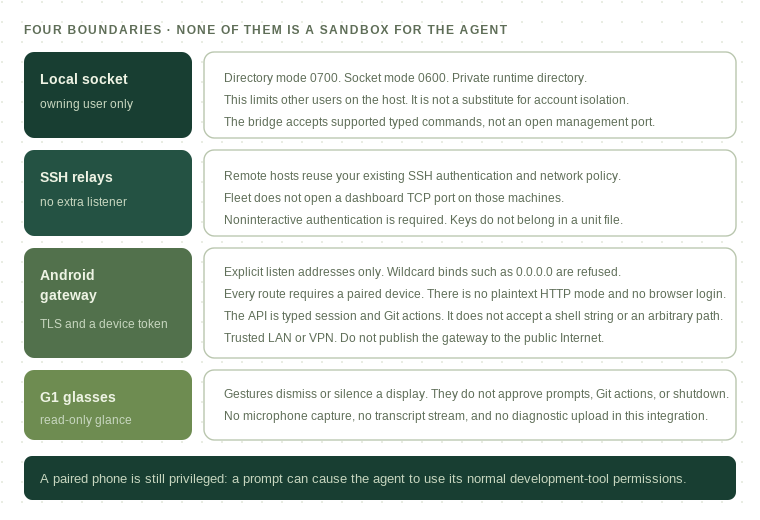
| Boundary | What it actually restricts |
|---|---|
Unix socket, 0700 / 0600 |
Other users on the host. Not a sandbox, and not a substitute for separating accounts |
| SSH relays | Remote management stays inside SSH policy. No extra Fleet listener |
| Gateway TLS and device token | The phone must present a paired identity. Hashes on the host, Keystore-backed secrets on the phone, independent revocation |
| Typed API | No arbitrary shell string, no arbitrary filesystem path, no slash-command injection from the phone |
| No browser login | Cookie and CORS-style browser access is rejected on purpose. This is not an unfinished web dashboard |
| No cloud relay | Away from the LAN, use a trusted VPN. Do not publish the gateway to avoid setting one up |
| Glasses | Display only. No approval path |
Observational views — state, usage, context, resources, roadmaps, peek, Git status — are separate from mutations such as prompts, abort, model changes, compaction, restart, pull, push, and branch switches. Mutations confirm.
The gateway does not forward every bridge field. Overviews omit complete transcripts and raw tool output. Detail can include bounded previews. Audit records store time, an opaque device id, action kind, target, and outcome. They are not supposed to store full prompts, replies, tokens, or Bluetooth payloads, and retention is bounded. Session names, previews, tool summaries, and project labels can still leak secrets. Do not pair a device you do not trust, do not screenshot private project text into a public place, and do not leave a pairing document in shared storage.
Fleet also tries to refuse a set of specific failure modes: two writers on one session file, commands aimed at a stale process identity, automatic replay after an uncertain send, invalid remote frames, unbounded stream buffering, unsafe Git branch changes, unconfirmed destructive actions, and treating missing data as zero or healthy. Those checks improve the odds. They do not make every agent action safe. The agent still runs with the operating-system permissions of the user who launched it.
Workflows that match the tools
Several local sessions. Start pi in each project, then pi-dash in a terminal that is not inside Screen. Tab moves to whoever has been waiting longest. s reads the latest answer. a attaches when you need the real terminal.
Sessions the dashboard owns. Press n, pick the project, and repeat. Those Screen sessions keep running when the dashboard is closed.
Something looks stalled. Check J before you assume the model is stuck. v shows the live terminal. If the bridge answers, i can ask what it is waiting on and what evidence says the work is moving. Do not abort on the heuristic alone.
A long build. Start it through the harness background-job path, then watch J for age and resources. Process exit is not a passing test. Read the result.
Money and context. u with t, w, m, and $ compares sessions, models, and hosts. Keep API-equivalent cost separate from the invoice. K finds sessions near the window. Compact with Z only when the session is idle and compaction is actually what you want, then read the result. The total may be unknown for a moment. That unknown is not zero.
Another machine. pi-dash-host add, pi-dash-host list, restart pi-dash, and use the host-qualified row. Recovery of a remote session is still e, then a confirmed resume, after the host is reachable and the ownership check passes.
Away from the desk. Gateway service, paired app, Sessions. Read status and the latest reply before you send a follow-up. If the connection is stale, wait for a fresh snapshot. Glasses, if you use them, stay on overview or a pinned session, with Silent Mode when you do not want the display to reassert itself. Approvals stay on the phone. Do not trust long screen-off monitoring until that phone and that pair of glasses have passed the acceptance checklist.
Update and test
Fleet is source-based. A pull can change the dashboard, the relay, the gateway, and the bridge protocol together. Protect local edits first.
cd "$HOME/GatPi-Fleet"
git status
git pull --ff-only
npm ci
npm run check
npm test
npm run test:e2e exercises a real interactive Pi in Screen, in an isolated environment, with local scripted-model behavior. It does not require sending ordinary production prompts to a paid provider. Run it when its prerequisites are available.
Then quit pi-dash with q and start it again. Existing Pi sessions can keep running, but reload them with /reload if the bridge changed. A protocol mismatch surfaces as a bridge-version warning. An old bridge should not be assumed to accept every new command. Redeploy remotes with pi-dash-host add, restart the gateway if you use systemd, and rebuild Android when the API contract changed. A routine update must not include pi-dash-server init. That command is for a deliberate identity change.
A sensible order: preserve local modifications, update, install dependencies, run host checks, redeploy relays, restart the dashboard, restart the gateway, reload bridges, update Android if the contract moved, then verify a live session.
Android verification, from android/, is the same Gradle task list as the build section, without assembleDebugAndroidTest if you only need the debug APK. Connected instrumentation is an extra pass on a real device. After an API change, npm run api:generate keeps the Kotlin fixtures aligned with the TypeScript schema.
Quota-renewal tests are narrower. They may need GNU Screen, tmux, Linux namespaces, and unshare. Some hardened distributions disable the unprivileged namespaces those tests use. That failure is an environment limit, not automatically an application defect.
Physical G1 behavior is outside the automated suites. Use the repository's acceptance document before you treat a phone and a pair of glasses as operational.
When something looks wrong
pi-dash is not found. Check the symlink, command -v, and whether ~/.local/bin is on PATH. Recreate the link only after you have looked at where it points.
No sessions. Pi must be running interactively, the package must be registered with pi install, and the session must have started or been reloaded since that install. Pi and Fleet must share a user and a consistent agent directory. /reload is the first check.
no bridge, or a protocol mismatch. The process may predate the install, or it may be an older bridge after an update. Reload it. On a remote host, pi-dash-host add redeploys, then reload that Pi. Restart the dashboard. Do not downgrade a remote relay just because an old dashboard is still running; update the dashboard.
Attach fails, or colors are wrong. screen --version and screen -ls. A bridged Pi that was not launched in Screen can still be monitored. It may have nothing to attach to. Screen 4 and Screen 5 are not interchangeable. The repository ships config/screenrc-4, config/screenrc-5, and config/screenrc. Host-specific overrides belong in ~/.config/pi-dash/screenrc. Do not paste unrelated screen, chdir, or select lines from a personal .screenrc into that file. They can change window creation and the working directory.
A remote host is offline or on the wrong relay. ssh -o BatchMode=yes worker-a true, then check Node, Pi, Screen, the deployed relay, and PATH. pi-dash-host add followed by pi-dash-host list is the repair. Restart the local dashboard and the gateway after a relay update.
Usage looks incomplete, or quota says unknown. Indexing may still be running. A remote host may be offline or still on its first scan. Some models have no price, which is not zero. Some extension calls sit outside ordinary transcript accounting. Quota can be unknown because the provider returned nothing useful, the login needs renewal in Pi, the endpoint is rate-limited, or the account type has no reader. Reloading the dashboard does not repair an invalid refresh token.
Context breakdown is missing, or recovery is unavailable. Update the relay and reload Pi. Historical and unbridged sessions may not have live composition. Recovery also fails closed when the session never had a compatible bridge, exited in a way that left nothing to resume, used --no-session, has no durable file, may still be owned by another process, or the remote host is unreachable. Do not bypass the exclusive reservation to "make it work."
The phone cannot connect. Service status, private-network reachability, firewall, configured URLs, certificate, pairing, phone clock, and protocol compatibility. systemctl --user status pi-dash-server and journalctl --user -u pi-dash-server -n 50 --no-pager are the host-side checks. Do not disable TLS verification as a workaround.
The gateway will not bind. ip address show. The address must belong to the host. A VPN address that is temporarily missing can be retried when it appears. A port owned by another process has to be resolved, then the gateway restarted.
An Android command outcome is unknown, or controls stay disabled after reconnect. Do not resend automatically. Inspect session state, the receipt, the gateway epoch, and the actual Git or session result. Dismiss an uncertain receipt only after that inspection. A reload or restart creates a new incarnation; old controls must not be reused. Wait for a fresh snapshot and reselect the session if you need to.
Glasses will not connect, or monitoring dies when the phone locks. Check Bluetooth, nearby-device permission, whether another app owns the pair, whether both arms are present, and whether the monitoring service is running. Do not wipe Bluetooth pairings without understanding ownership. Manufacturer battery policy can stop a foreground service. Fleet does not promise indefinite screen-off operation. Use the acceptance procedure on the hardware you have.
Boundaries
A few limits are part of the design, not missing polish.
The host tools are Linux-specific. This snapshot does not document equivalent native Windows or macOS deployments. The live bridge loads in interactive Pi. RPC and print-mode agents do not automatically expose it, though a parent session may still be charged for their resources. Remote hosts need working SSH and compatible software; Fleet does not create users, keys, routes, or firewall rules. Usage figures are not a billing system. Context composition is an estimate. Recovery does not restore in-flight tools. Android is not a terminal and not a slash-command UI. There is no offline command queue and no public cloud relay. G1 hardware acceptance is still an open checklist, not a completed claim.
Possible later work — broader platforms, more collectors, richer history, closer Android parity, device acceptance, migration tooling — is a list of possibilities. It is not a commitment, and it is not a description of what the snapshot already does.
The useful split, once all three repositories are in play, is the same one the rest of this site's GatPi notes use. GatPi executes the agent. GatPi-Harness extends that agent and holds verification and memory to an authority boundary. GatPi-Fleet observes, manages, and recovers the sessions. A system that can produce code is useful. A system whose sessions stay visible, resumable, and controllable across machines is the one you can actually leave running.